Practice management that lives in your Microsoft 365
Matters, time, billing, trust accounting and documents in one place, with an AI assistant that finds the hours you forgot to record. Your documents stay in your own tenant.
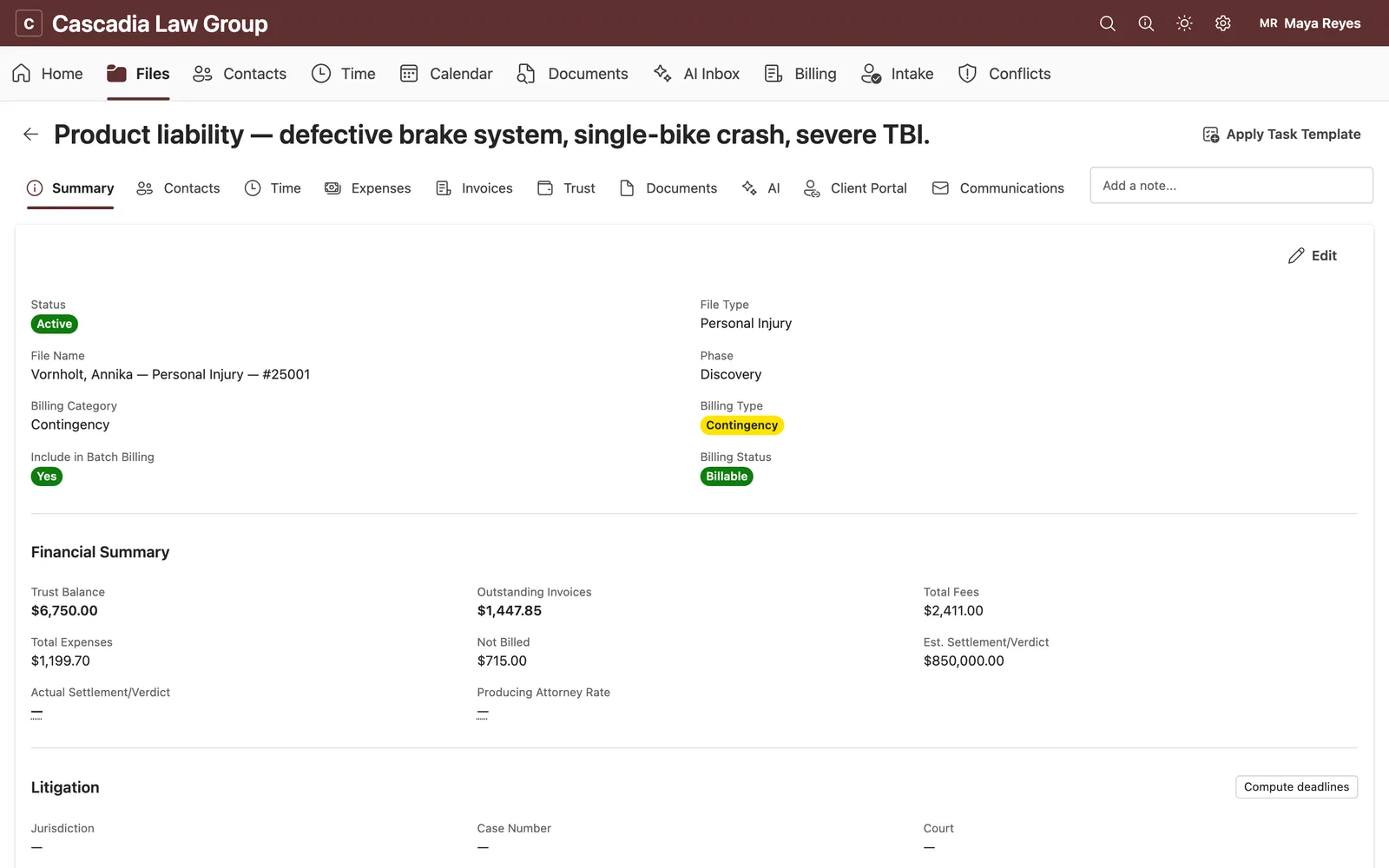
One system from intake to trust reconciliation
Proserus replaces the practice management tool, the billing tool and the folder of spreadsheets, and it does it on the Microsoft 365 your firm already pays for.
Every matter, with its own SharePoint site
Open a matter and Proserus provisions a SharePoint site and document library for it in your tenant, links the client and the other parties, and runs a conflict check against everyone you have ever represented or opposed.
- Contacts with roles, related parties and conflict history
- Responsible and billing attorney, status, deadlines and tasks
- Users without firm-wide access see only the matters they are assigned to
Record time where the day actually happens
A week view of your entries sits next to your Outlook calendar. Meetings, email threads and document edits become suggested entries that you accept or discard, so the day ends with the hours you worked.
- Calendar, grid and list entry, from the web app, Teams or the Outlook add-in
- Rates by timekeeper, matter and activity, applied automatically
- Narratives tidied before they reach a client, in your own words
From pre-bill to paid without re-keying anything
Proof entries, build the pre-bill, apply trust funds, send a branded invoice with a pay link, and record the payment when it lands. The invoice total you see is the one the ledger stores and the pay link charges.
- Pre-bill review with write-ups, write-downs and holds
- Branded PDF invoices from your own bill templates
- Online payments, reminders, A/R aging and collections notes
Three-way reconciliation your auditor will recognise
Every trust movement is a double-entry journal line against a client ledger. Month end compares the bank statement, the journal and the sum of client ledgers, records the outstanding items, and freezes the signed-off period.
- Client ledgers can never go negative; the database refuses it
- Outstanding checks and deposits tracked to resolution
- Sign-off locks the period and keeps an immutable snapshot and audit trail
Generated from your templates, stored in your tenant
Documents live in the matter’s SharePoint library, so Word, Outlook and Teams already know where they are. Generate engagement letters, pleadings and demand packages from your firm’s templates, send them for e-signature, and share them to the client portal.
- Your Word templates with matter, contact and billing fields merged in
- E-signature and client portal sharing from the same screen
- Indexed for Ask Your Matter, with retention under your M365 policies
An assistant that already knows the file
Not a chat box bolted on the side. Proserus reads the matter, the calendar and the inbox you have given it access to, and turns them into time entries, briefs and answers with citations.
Found time
Meetings, email threads and document edits become suggested entries. Accept, edit or dismiss; nothing is billed without you.
Ask Your Matter
Questions answered from the matter's own documents with page-level citations, plus firm knowledge search across matters you can see.
Morning digest
Deadlines, unbilled work, overdue invoices and trust items in one short briefing, delivered to Outlook and Teams before the day starts.
- Every AI action is a proposal you approve; autonomy is something you switch on per action type, never the default
- Answers cite the matter’s own documents, and the model only sees matters the user is allowed to see
- Bring your own provider keys if your firm already has an AI agreement, or use ours with included credits
Built in, not bolted on
Conflict checking
Search parties, related entities and prior matters before you open a file; results are logged with the matter.
Intake and leads
A web intake form, lead pipeline and screening questions, with AI summaries of what the prospect sent.
Client portal
Clients see shared documents, invoices and trust statements, and pay online, from a passkey-protected portal.
E-signature
Send engagement letters and other documents for signature; the signed copy lands back in the matter library.
Calendar sync
Matter deadlines and events sync both ways with Outlook, so the firm calendar and the matter agree.
Outlook add-in and Teams app
File email to a matter, record time from a message, and run the whole app inside Teams.
Reports
WIP, A/R aging, production by timekeeper, realisation and trust balances, exportable to Excel.
Litigation archives
Large productions move out of the active library into archive storage we host in the US, still indexed and searchable.
Read more: Practice management for Microsoft 365 · Trust accounting · Conflict checks · Found time · Client intake · Agentic AI supervision · SharePoint matter sites
Live on your own tenant in an afternoon
Three steps from sign-in to the first billable hour. No data migration project, no parallel systems.
An admin signs in with Microsoft
A Microsoft 365 administrator at your firm signs in and approves Proserus for the tenant. No new identity system, no passwords to manage.
Name the firm and invite the team
Your people sign in with the accounts they already have. Roles decide who sees billing, trust and which matters.
Open a matter and start recording time
The first matter gets its SharePoint site in seconds. Import contacts and open matters from a spreadsheet when you are ready; nothing has to migrate on day one.
Not an integration. The platform.
Most practice tools copy your documents into their cloud and call the Microsoft connection an add-on. Proserus leaves documents, mail and calendar where they are and works through Microsoft Graph with the permissions your admin grants.
- Entra IDSign-in, MFA and Conditional Access policies apply as they do everywhere else.
- SharePointA site and document library per matter, under your retention and DLP policies.
- OutlookMail and calendar stay in the mailbox; Proserus reads what it is allowed to and syncs deadlines.
- TeamsThe full app as a Teams tab, with an optional team per matter.
- Practice recordsMatters, contacts, time, invoices and trust ledgers in a database isolated per firm with row-level security.
- Ledgers and auditDouble-entry trust journal, append-only audit log, locked reconciliation periods.
- AI gatewayEvery model call goes through one gateway with your retention and autonomy settings; no provider sees more than the request.
- Your keys, if you wantBring your own AI provider keys and the usage bills through your agreement, not ours.
Leave Proserus and your documents, mail and calendar are exactly where they were. Practice records export on request. Read the security overview
Frequently asked
What is Proserus?
How is it different from other practice management tools?
Where is our data stored?
What Microsoft 365 plan do we need?
How long does setup take?
How does the AI work, and what does it see?
Does it handle trust accounting properly?
What happens if we stop using Proserus?
How does the free trial work?
Try it on your own tenant this afternoon
A 30-day trial of every feature, no card required. Or book a 30-minute walkthrough and we will set up your first matter with you.
Existing customer?